[](https://github.com/kaz-utashiro/App-Greple-xlate/actions?workflow=test)
# NAME
App::Greple::xlate - translation support module for greple
# SYNOPSIS
greple -Mxlate --xlate-engine gpt5 --xlate pattern target-file
greple -Mxlate --xlate-engine deepl --xlate pattern target-file
# VERSION
Version 2.00
# DESCRIPTION
**Greple** **xlate** module find desired text blocks and replace them by
the translated text. The primary engine is GPT-5.5 (`llm/gpt5.pm`),
which calls the [llm](https://llm.datasette.io/) command; DeepL
(`deepl.pm`) and legacy **gpty**-based engines are also included.
Translations are cached per file, so re-running a command costs
nothing for unchanged text. When a document is edited, only the
changed paragraphs are sent to the API again; a context-aware engine
also receives the surrounding translations, the raw source text
around the change, and the previous version of the edited paragraph,
so the new translation keeps the established wording (see
**--xlate-context-window**). Sensitive strings can be concealed
before transmission (see ["ANONYMIZATION AND TEMPLATES"](#anonymization-and-templates)).
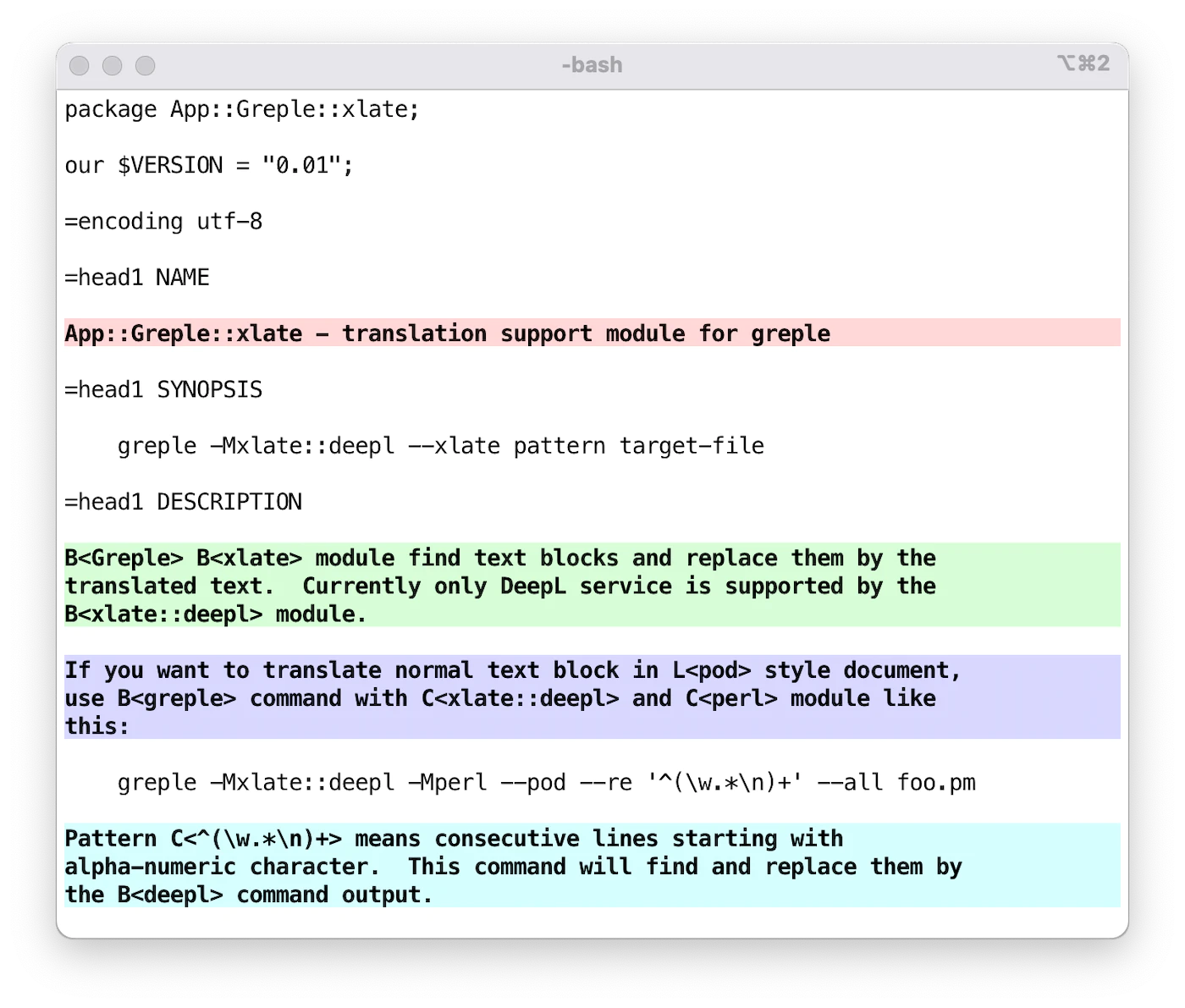
If you want to translate normal text blocks in a document written in
the Perl's pod style, use **greple** command with `--xlate-engine gpt5`
and `perl` module like this:
greple -Mxlate --xlate-engine gpt5 -Mperl --pod --re '^([\w\pP].*\n)+' --all foo.pm
In this command, pattern string `^([\w\pP].*\n)+` means consecutive
lines starting with alpha-numeric and punctuation letter. This
command show the area to be translated highlighted. Option **--all**
is used to produce entire text.
Then add `--xlate` option to translate the selected area. Then, it
will find the desired sections and replace them by the translation
engine's output.
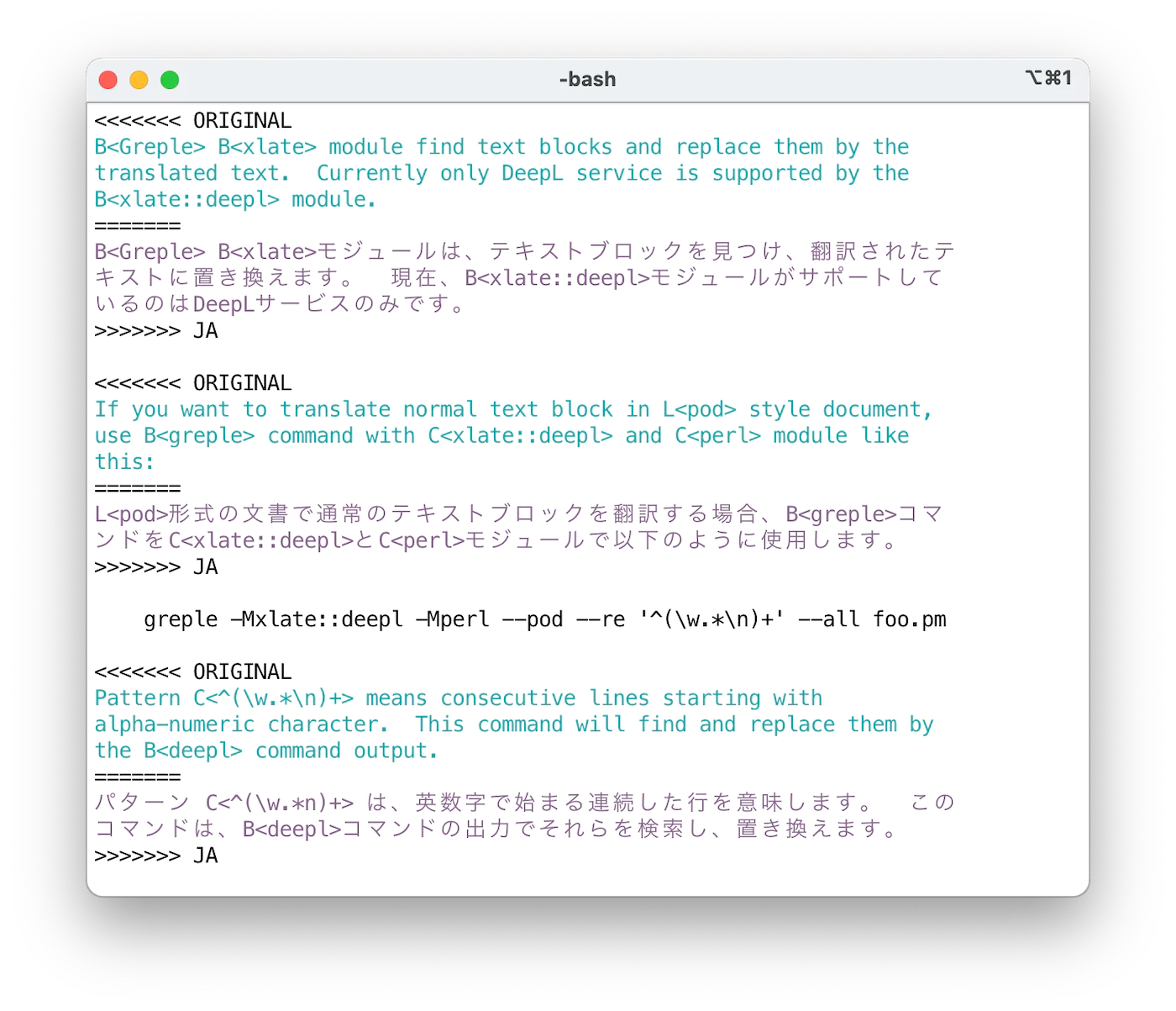
By default, original and translated text is printed in the "conflict
marker" format compatible with [git(1)](http://man.he.net/man1/git). Using `ifdef` format, you
can get desired part by [unifdef(1)](http://man.he.net/man1/unifdef) command easily. Output format
can be specified by **--xlate-format** option.
If you want to translate entire text, use **--match-all** option. This
is a short-cut to specify the pattern `(?s).+` which matches entire
text.
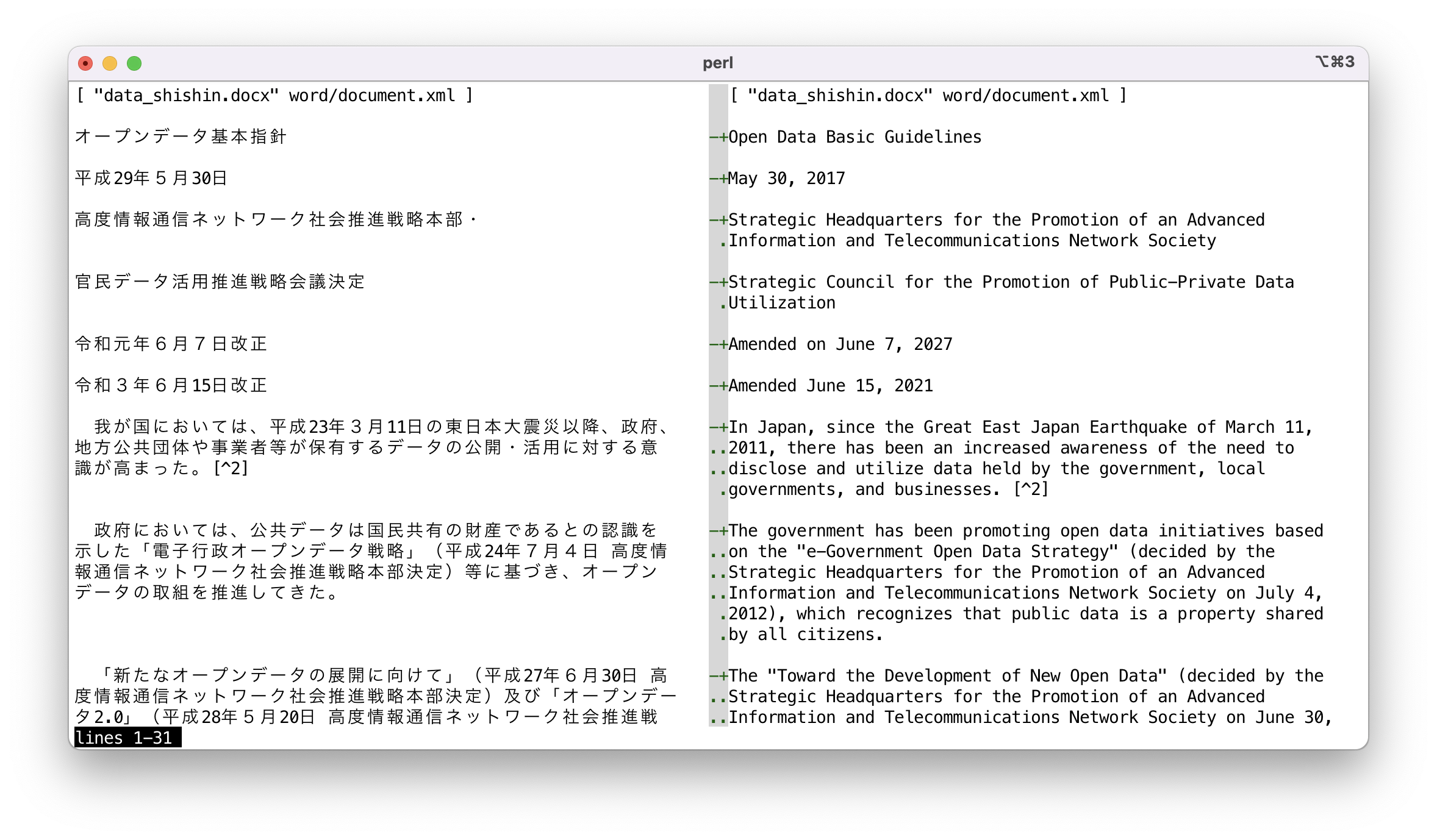
Conflict marker format data can be viewed in side-by-side style by
[sdif](https://metacpan.org/pod/App%3A%3Asdif) command with `-V` option. Since it makes no sense
to compare on a per-string basis, the `--no-cdif` option is
recommended. If you do not need to color the text, specify
`--no-textcolor` (or `--no-tc`).
sdif -V --no-filename --no-tc --no-cdif data_shishin.deepl-EN-US.cm
# NORMALIZATION
Processing is done in specified units, but in the case of a sequence
of multiple lines of non-empty text, they are converted together into
a single line. This operation is performed as follows:
- Remove white space at the beginning and end of each line.
- If a line ends with a full-width punctuation character, concatenate
with next line.
- If a line ends with a full-width character and the next line begins
with a full-width character, concatenate the lines.
- If either the end or the beginning of a line is not a full-width
character, concatenate them by inserting a space character.
Cache data is managed based on the normalized text, so even if
modifications are made that do not affect the normalization results,
the cached translation data will still be effective.
This normalization process is performed only for the first (0th) and
even-numbered pattern. Thus, if two patterns are specified as
follows, the text matching the first pattern will be processed after
normalization, and no normalization process will be performed on the
text matching the second pattern.
greple -Mxlate -E normalized -E not-normalized
Therefore, use the first pattern for text that is to be processed by
combining multiple lines into a single line, and use the second
pattern for pre-formatted text. If there is no text to match in the
first pattern, use a pattern that does not match anything, such as
`(?!)`.
# MASKING
Occasionally, there are parts of text that you do not want translated.
For example, tags in markdown files. DeepL suggests that in such
cases, the part of the text to be excluded be converted to XML tags,
translated, and then restored after the translation is complete. To
support this, it is possible to specify the parts to be masked from
translation.
--xlate-setopt maskfile=MASKPATTERN
This will interpret each line of the file `MASKPATTERN` as a regular
expression, translate strings matching it, and revert after
processing. Lines beginning with `#` are ignored.
Complex pattern can be written on multiple lines with backslash
escaped newline.
How the text is transformed by masking can be seen by **--xlate-mask**
option.
Masking protects markup from being translated. To conceal sensitive
strings from the translation service itself, see ["ANONYMIZATION AND
TEMPLATES"](#anonymization-and-templates); both can be used together.
This interface is experimental and subject to change in the future.
# ANONYMIZATION AND TEMPLATES
Sensitive strings can be concealed before they are sent to the
translation API and restored in the output. Three sources of
anonymization rules are available: a dictionary file
(**--xlate-anonymize**), inline marks in the document itself
(**--xlate-anonymize-mark**), and YAML front matter values
(**--xlate-frontmatter**). Each string is replaced by a category tag
such as `` during transmission. The concealment
target is API transmission only: local cache files store restored
plain text. Use **--xlate-dryrun** to inspect exactly what would be
transmitted.
For form documents (quarterly reports and the like), define the
actors up front and reference them in the body:
---
報告者: 山田太郎
発注会社: アクメ株式会社
---
本件について {{ 報告者 }} が調査を行った。
Translate the template once per language with `--xlate-template`
(and `--xlate-frontmatter` when the values are kept in the file),
then render each case with **pandoc-embedz** standalone mode --
values under `global:` in an external config never reach the
translation API at all:
greple -Mxlate --xlate --xlate-engine=gpt5 --xlate-to=EN-US \
--xlate-template= --xlate-format=xtxt \
--match-paragraph --all --need=0 \
report-template.md > report-template.EN.md
pandoc-embedz --standalone report-template.EN.md \
-c case-123.yaml -o report-123.EN.md < /dev/null
For inline marks, providing a macro definition config makes the same
translated template render either the real names or a redacted
version:
# macros.yaml # macros-redacted.yaml
preamble: | preamble: |
{% macro person(name) %}{{ name }}{% endmacro %}
{% macro person(name) %}(関係者){% endmacro %}
Exclude embedz blocks from translation when a document contains them:
--exclude '^```embedz\n(?s:.*?)^```\n'
# OPTIONS
- **--xlate**
- **--xlate-color**
- **--xlate-fold**
- **--xlate-fold-width**=_n_ (Default: 70)
Invoke the translation process for each matched area.
Without this option, **greple** behaves as a normal search command. So
you can check which part of the file will be subject of the
translation before invoking actual work.
Command result goes to standard out, so redirect to file if necessary,
or consider to use [App::Greple::update](https://metacpan.org/pod/App%3A%3AGreple%3A%3Aupdate) module.
Option **--xlate** calls **--xlate-color** option with **--color=never**
option.
With **--xlate-fold** option, converted text is folded by the specified
width. Default width is 70 and can be set by **--xlate-fold-width**
option. Four columns are reserved for run-in operation, so each line
could hold 74 characters at most.
- **--xlate-engine**=_engine_
Specifies the translation engine to be used.
At this time, the following engines are available
- **gpt5**: gpt-5.5 (via the `llm` command)
- **deepl**: DeepL API (via the `deepl` command)
- **gpt3**: gpt-3.5-turbo (legacy, via the `gpty` command)
- **gpt4o**: gpt-4o-mini (legacy, via the `gpty` command)
Engine modules are searched in backend namespaces first (`llm`, then
`gpty`), then directly under `App::Greple::xlate`. So `gpt5` loads
`App::Greple::xlate::llm::gpt5` which calls the `llm` command, while
`gpt4o` falls back to `App::Greple::xlate::gpty::gpt4o`. Use
`--xlate-setopt backend=gpty` to force a specific backend.
- **--xlate-labor**
- **--xlabor**
Instead of calling translation engine, you are expected to work for.
After preparing text to be translated, they are copied to the
clipboard. You are expected to paste them to the form, copy the
result to the clipboard, and hit return.
- **--xlate-to** (Default: `EN-US`)
Specify the target language. LLM engines accept any language name
or code the model understands; it is interpolated into the
translation prompt. You can get available languages by `deepl
languages` command when using **DeepL** engine.
- **--xlate-from** (Default: `ORIGINAL`)
Label used for the original text in `conflict`, `colon` and
`ifdef` output formats. With the **DeepL** engine a non-default
value is also passed as the source language.
- **--xlate-format**=_format_ (Default: `conflict`)
Specify the output format for original and translated text.
The following formats other than `xtxt` assume that the part to be
translated is a collection of lines. In fact, it is possible to
translate only a portion of a line, but specifying a format other than
`xtxt` will not produce meaningful results.
- **conflict**, **cm**
Original and converted text are printed in [git(1)](http://man.he.net/man1/git) conflict marker
format.
<<<<<<< ORIGINAL
original text
=======
translated Japanese text
>>>>>>> JA
You can recover the original file by next [sed(1)](http://man.he.net/man1/sed) command.
sed -e '/^<<<<<<< /d' -e '/^=======$/,/^>>>>>>> /d'
- **colon**, _:::::::_
The original and translated text are output in a markdown's custom
container style.
::::::: ORIGINAL
original text
:::::::
::::::: JA
translated Japanese text
:::::::
Above text will be translated to the following in HTML.
original text
translated Japanese text
Number of colon is 7 by default. If you specify colon sequence like
`:::::`, it is used instead of 7 colons.
- **ifdef**
Original and converted text are printed in [cpp(1)](http://man.he.net/man1/cpp) `#ifdef`
format.
#ifdef ORIGINAL
original text
#endif
#ifdef JA
translated Japanese text
#endif
You can retrieve only Japanese text by the **unifdef** command:
unifdef -UORIGINAL -DJA foo.ja.pm
- **space**
- **space+**
Original and converted text are printed separated by single blank
line. For `space+`, it also outputs a newline after the converted
text.
- **xtxt**
If the format is `xtxt` (translated text) or unkown, only translated
text is printed.
- **--xlate-maxlen**=_chars_ (Default: 0)
Specify the maximum length of text to be sent to the API at once.
The default value 0 means the engine's own limit: for the free DeepL
account service that is 128K for the API (**--xlate**) and 5000 for
the clipboard interface (**--xlate-labor**). You may be able to
change these value if you are using Pro service.
- **--xlate-maxline**=_n_ (Default: 0)
Specify the maximum lines of text to be sent to the API at once.
Set this value to 1 if you want to translate one line at a time. This
option takes precedence over the `--xlate-maxlen` option.
- **--xlate-prompt**=_text_
Specify a custom prompt to be sent to the translation engine. This
option is available for the LLM engines (`gpt3`, `gpt4o`, `gpt5`)
but not for DeepL. You can customize the translation behavior by
providing specific instructions to the AI model. If the prompt
contains `%s`, it will be replaced with the target language name.
- **--xlate-context**=_text_
Specify additional context information to be sent to the translation
engine. This option can be used multiple times to provide multiple
context strings. The context information helps the translation engine
understand the background and produce more accurate translations.
- **--xlate-context-window**=_n_
(Context-aware engines only, e.g. `gpt5` on the llm backend)
Number of surrounding translated blocks passed as reference context
when re-translating changed blocks (default 2). The context also
includes the raw source text around the changed region (headings,
list structure, captions) and, when available, the previous version
of the changed text recovered from the cache, so that unchanged
wording is preserved. Set to 0 to disable context-aware translation
entirely.
Note that each changed region is translated in its own API call and
the context can add up to about 8000 characters to the system
prompt, so context-aware translation trades some extra cost for
consistency.
- **--xlate-cache-seed**=_file_
Initialize a new document's cache from another document's cache
file. Useful for periodic reports: seed the new issue's cache with
the previous issue's, so unchanged paragraphs are not re-translated
and edited paragraphs keep the previous issue's wording. The seed
is used only when the target cache is empty; otherwise it is
ignored with a warning. With the default `--xlate-cache=auto`, specifying a seed also
implies creating the new document's cache file.
- **--xlate-anonymize**=_file_
Anonymize sensitive strings before they are sent to the translation
API, and restore them in the output. The dictionary file gives one
entry per item: in JSON (canonical, machine-generatable)
[ { "category": "person", "text": "山田太郎" },
{ "category": "company", "regex": "アクメ(株式会社)?" } ]
or in a simple line format (`category pattern`, `/.../` for regex).
Each item is replaced by a category tag such as ``;
the same string always gets the same tag, so the model can keep track
of who is who. Unknown JSON fields are ignored, so generators (e.g. a
local LLM extracting entities) may add their own annotations.
Category `lit` is reserved. Local cache files still store restored
plain text: the concealment target is API transmission only.
A dictionary can be generated by an external tool -- for example a
local model extracting sensitive entities:
llm -m \
-s 'Extract sensitive entities as a JSON array of objects
with "category" and "text" fields.' \
< report.md > report.anon.json
greple -Mxlate --xlate-anonymize=report.anon.json ...
A UTF-8 BOM in the file is tolerated. Values in the front matter
line format may carry a trailing comment only on their own line, not
after the value.
- **--xlate-anonymize-mark**\[=_regex_\]
Collect anonymization entries from inline marks in the document
itself. Mark the first occurrence like `{{ person("山田太郎") }}`
and every occurrence of the string document-wide is anonymized. The
mark itself stays in the source and in the translation, so a document
can also be processed by a Jinja2-style macro processor (define the
`person` macro to print or redact the name). A custom _regex_ must
contain `(?...)` and `(?...)` named captures.
Note that with an optional-value option like this, a following
file argument would be taken as the value: write
`--xlate-anonymize-mark=` (with a trailing `=`) when using the
default notation.
Alternative notations can be configured, for example
`--xlate-anonymize-mark='@@(?[a-z][a-z0-9_]*):(?[^\n]+?)@@'`
for `@@person:NAME@@`-style marks, or an HTML-comment form that stays
invisible in rendered Markdown. Mark rules are collected per
document: a string marked in one input file is not concealed in
another file of the same run (unlike front matter values, which
accumulate across files).
- **--xlate-template**\[=_regex_\]
Treat template expressions (default: Jinja2 `{{ ... }}`,
`{% ... %}`, `{# ... #}`) as opaque placeholders: instruct the
model to copy them unchanged and verify, per block, that the response
contains exactly the same expressions, each the same number of times.
Their order may change, since translation legitimately reorders them
to follow the target language word order. A broken expression
aborts the run; the cache is checkpointed and frozen, so nothing paid
for is lost.
Note that with an optional-value option like this, a following
file argument would be taken as the value: write
`--xlate-template=` (with a trailing `=`) when using the
default notation.
- **--xlate-frontmatter**
Treat a leading `---` ... `---` block as YAML front matter: exclude
it from translation and from the phase-2 context slices, and add its
flat `key: value` values to the anonymization rules (category
`var`) as a safety net. With multiple input files the collected
values accumulate (erring on the side of concealment).
Always leave a blank line after the closing `---`. With a
paragraph-style match pattern, front matter that runs directly into
the body text forms one straddling block that the exclusion cannot
suppress (a warning is printed in that case); the values are still
anonymized, but the front matter itself would be sent for
translation.
- **--xlate-glossary**=_glossary_
Specify a glossary ID to be used for translation. This option is only
available when using the DeepL engine. The glossary ID should be obtained
from your DeepL account and ensures consistent translation of specific terms.
- **--xlate-dryrun**
Do not call the translation API; instead show, through the progress
display, each payload exactly as it would be transmitted (after
anonymization and masking). Useful for checking what leaves the
machine and for estimating the cost of a run.
- **--**\[**no-**\]**xlate-progress** (Default: True)
See the translation result in real time in the STDERR output. The
`From` payload is shown as transmitted, after anonymization and
masking.
- **--xlate-stripe**
Use [App::Greple::stripe](https://metacpan.org/pod/App%3A%3AGreple%3A%3Astripe) module to show the matched part by zebra
striping fashion. This is useful when the matched parts are connected
back-to-back.
The color palette is switched according to the background color of the
terminal. If you want to specify explicitly, you can use
**--xlate-stripe-light** or **--xlate-stripe-dark**.
- **--xlate-mask**
Perform masking function and display the converted text as is without
restoration.
- **--match-all**
Set the whole text of the file as a target area.
- **--lineify-cm**
- **--lineify-colon**
In the case of the `cm` and `colon` formats, the output is split and
formatted line by line. Therefore, if only a portion of a line is to
be translated, the expected result cannot be obtained. These filters
fix output that is corrupted by translating part of a line into normal
line-by-line output.
In the current implementation, if multiple parts of a line are
translated, they are output as independent lines.
# CACHE OPTIONS
**xlate** module can store cached text of translation for each file and
read it before execution to eliminate the overhead of asking to
server. With the default cache strategy `auto`, it maintains cache
data only when the cache file exists for target file.
Use **--xlate-cache=clear** to initiate cache management or to clean up
all existing cache data. Once executed with this option, a new cache
file will be created if one does not exist and then automatically
maintained afterward.
- --xlate-cache=_strategy_
- `auto` (Default)
Maintain the cache file if it exists.
- `create`
Create empty cache file and exit.
- `always`, `yes`, `1`
Maintain cache anyway as far as the target is normal file.
- `clear`
Clear the cache data first.
- `never`, `no`, `0`
Never use cache file even if it exists.
- `accumulate`
By default behavior, unused data is removed from the cache file. If
you don't want to remove them and keep in the file, use `accumulate`.
- **--xlate-update**
This option forces to update cache file even if it is not necessary.
# COMMAND LINE INTERFACE
You can easily use this module from the command line by using the
`xlate` command included in the distribution. See the `xlate` man
page for usage.
The `xlate` command supports GNU-style long options such as
`--to-lang`, `--from-lang`, `--engine`, and `--file`. Use
`xlate -h` to see all available options.
The `xlate` command works in concert with the Docker environment, so
even if you do not have anything installed on hand, you can use it as
long as Docker is available. Use `-D` or `-C` option.
Docker operations are handled by [App::dozo](https://metacpan.org/pod/App%3A%3Adozo), which can also be
used as a standalone command. The `dozo` command supports the
`.dozorc` configuration file for persistent container settings.
Also, since makefiles for various document styles are provided,
translation into other languages is possible without special
specification. Use `-M` option.
You can also combine the Docker and `make` options so that you can
run `make` in a Docker environment.
Running like `xlate -C` will launch a shell with the current working
git repository mounted.
Read Japanese article in ["SEE ALSO"](#see-also) section for detail.
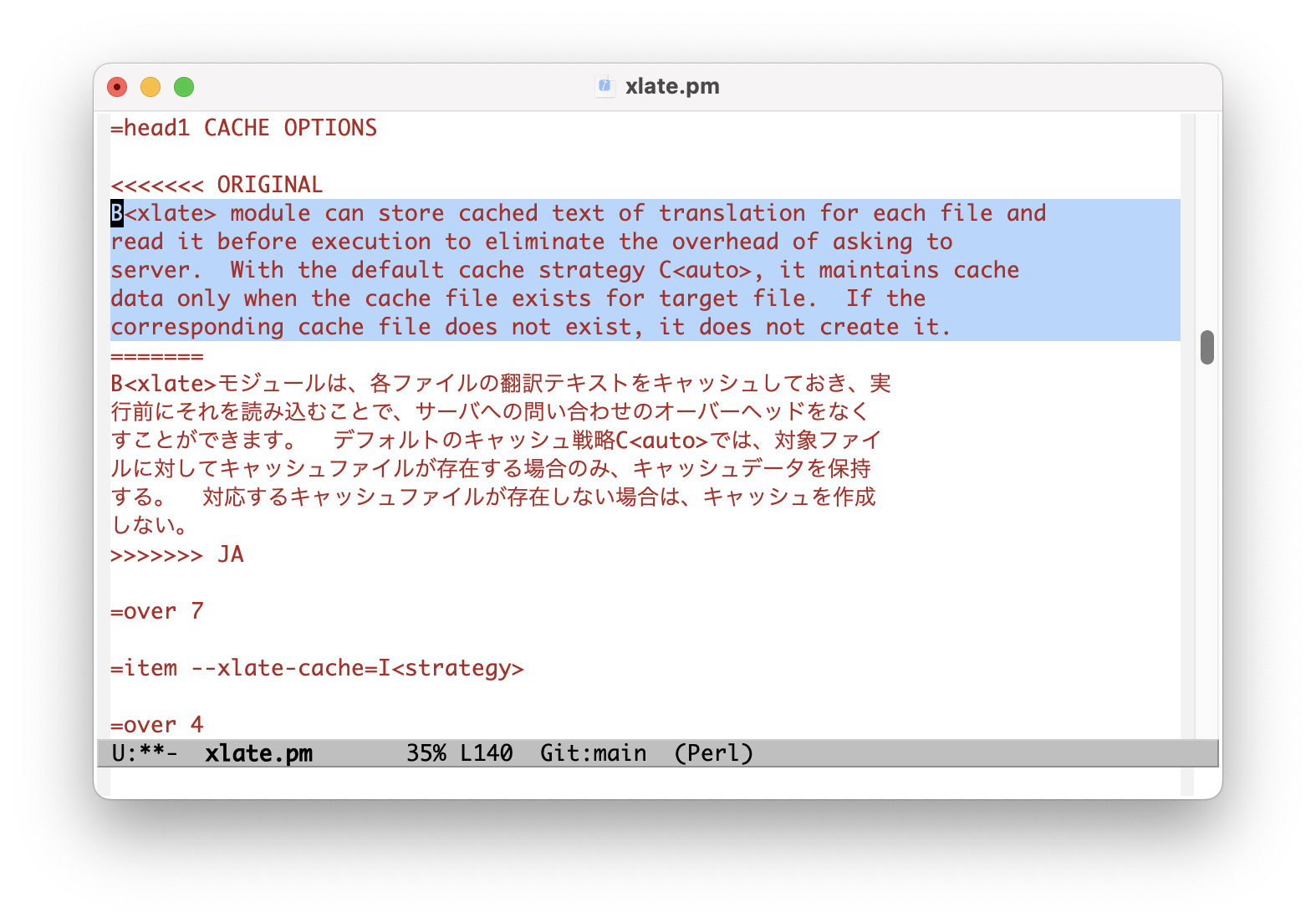
# EMACS
Load the `xlate.el` file included in the repository to use `xlate`
command from Emacs editor. `xlate-region` function translate the
given region. Default language is `EN-US` and you can specify
language invoking it with prefix argument.
# ENVIRONMENT
- DEEPL\_AUTH\_KEY
Set your authentication key for DeepL service.
- OPENAI\_API\_KEY
OpenAI authentication key, used by the legacy **gpty** engines. The
`llm`-based **gpt5** engine reads this variable too, but keys stored
with `llm keys set openai` also work.
- GREPLE\_XLATE\_CACHE
Set the default cache strategy (see ["CACHE OPTIONS"](#cache-options)).
# INSTALL
## CPANMINUS
$ cpanm App::Greple::xlate
## TOOLS
Install the command line tool for the engine you use: `llm` for the
**gpt5** engine, `deepl` for DeepL, `gpty` for the legacy GPT
engines.
[https://llm.datasette.io/](https://llm.datasette.io/)
[https://github.com/DeepLcom/deepl-python](https://github.com/DeepLcom/deepl-python)
[https://github.com/tecolicom/App-gpty](https://github.com/tecolicom/App-gpty)
# SEE ALSO
## MODULES
[App::Greple::xlate::llm](https://metacpan.org/pod/App%3A%3AGreple%3A%3Axlate%3A%3Allm),
[App::Greple::xlate::deepl](https://metacpan.org/pod/App%3A%3AGreple%3A%3Axlate%3A%3Adeepl)
[App::dozo](https://metacpan.org/pod/App%3A%3Adozo) - Generic Docker runner used by xlate for container operations
## RELATED MODULES
- [App::Greple](https://metacpan.org/pod/App%3A%3AGreple)
See the **greple** manual for the detail about target text pattern.
Use **--inside**, **--outside**, **--include**, **--exclude** options to
limit the matching area.
- [App::Greple::update](https://metacpan.org/pod/App%3A%3AGreple%3A%3Aupdate)
You can use `-Mupdate` module to modify files by the result of
**greple** command.
- [App::sdif](https://metacpan.org/pod/App%3A%3Asdif)
Use **sdif** to show conflict marker format side by side with **-V**
option.
- [App::Greple::stripe](https://metacpan.org/pod/App%3A%3AGreple%3A%3Astripe)
Greple **stripe** module use by **--xlate-stripe** option.
## RESOURCES
- [https://hub.docker.com/r/tecolicom/xlate](https://hub.docker.com/r/tecolicom/xlate)
Docker container image.
- [https://github.com/tecolicom/getoptlong](https://github.com/tecolicom/getoptlong)
The `getoptlong.sh` library used for option parsing in the `xlate`
script and [App::dozo](https://metacpan.org/pod/App%3A%3Adozo).
- [https://llm.datasette.io/](https://llm.datasette.io/)
The `llm` command used by the **gpt5** engine to access LLM models.
- [https://github.com/DeepLcom/deepl-python](https://github.com/DeepLcom/deepl-python)
DeepL Python library and CLI command.
- [https://github.com/openai/openai-python](https://github.com/openai/openai-python)
OpenAI Python Library
- [https://github.com/tecolicom/App-gpty](https://github.com/tecolicom/App-gpty)
OpenAI command line interface
## ARTICLES
- [https://qiita.com/kaz-utashiro/items/1c1a51a4591922e18250](https://qiita.com/kaz-utashiro/items/1c1a51a4591922e18250)
Greple module to translate and replace only the necessary parts with DeepL API (in Japanese)
- [https://qiita.com/kaz-utashiro/items/a5e19736416ca183ecf6](https://qiita.com/kaz-utashiro/items/a5e19736416ca183ecf6)
Generating documents in 15 languages with DeepL API module (in Japanese)
- [https://qiita.com/kaz-utashiro/items/1b9e155d6ae0620ab4dd](https://qiita.com/kaz-utashiro/items/1b9e155d6ae0620ab4dd)
Automatic translation Docker environment with DeepL API (in Japanese)
# AUTHOR
Kazumasa Utashiro
# LICENSE
Copyright © 2023-2026 Kazumasa Utashiro.
This library is free software; you can redistribute it and/or modify
it under the same terms as Perl itself.